Question templates with Widget API v2
Draw the video’s questions in your own lookA question template draws the video’s questions in its own look. Creators write the questions in Creative Studio (text, options, the right answer, feedback, what happens next) and choose a template for a question on its Appearance page, or for every question of a player skin (Customisation → Player themes). One template draws many questions in many videos, each with its own words: it never knows them in advance and has no properties.
A question template is written with Widget API v2, like a widget: everything in that guide about the sealed box, w, the look, behaviour, animation, variables and errors holds here too. This page covers what is different. The rules, one by one, are in the Reference.
For using question templates in your videos without writing code (choosing a ready one, describing one to AI Writer, applying it), see How to use question templates.
Make one
Customisation → Question templates → New question template: describe it and let AI Writer write it, start from a ready one (Quiz card, Side panel), or Blank with the types it will draw. The editor’s Question tab replaces Properties:
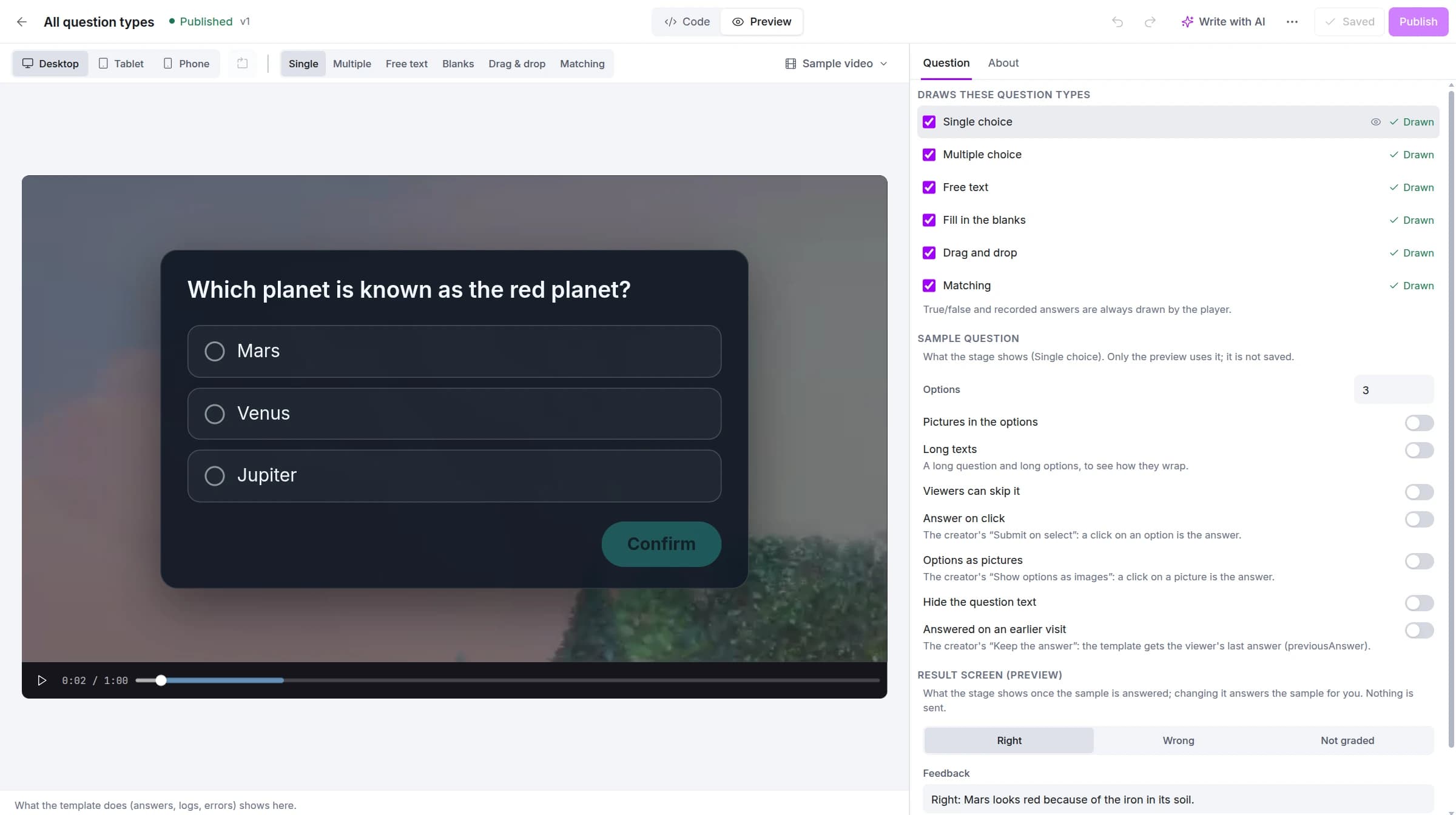
- Draws these question types: the types the template lists. A type it does not list is drawn by the player in its own look; true/false and recorded answers are always the player’s. Each listed type gets a mark from the editor’s check: Drawn, Doesn’t draw it (listed but not drawn, with what is missing), or Not listed (named in the code but not listed).
- Sample question: what the stage shows (the type, the number of options, pictures, long texts, skippable, answer on click, options as pictures, hidden text, an earlier visit’s answer). Only the preview uses it.
- Result screen (preview): what the preview’s “server” answers (right, wrong, not graded, the feedback). Nothing is sent anywhere from the editor.
The stage’s switch above the video (Single, Multiple, Free text, Blanks, Drag & drop, Matching) shows the sample question in each type.
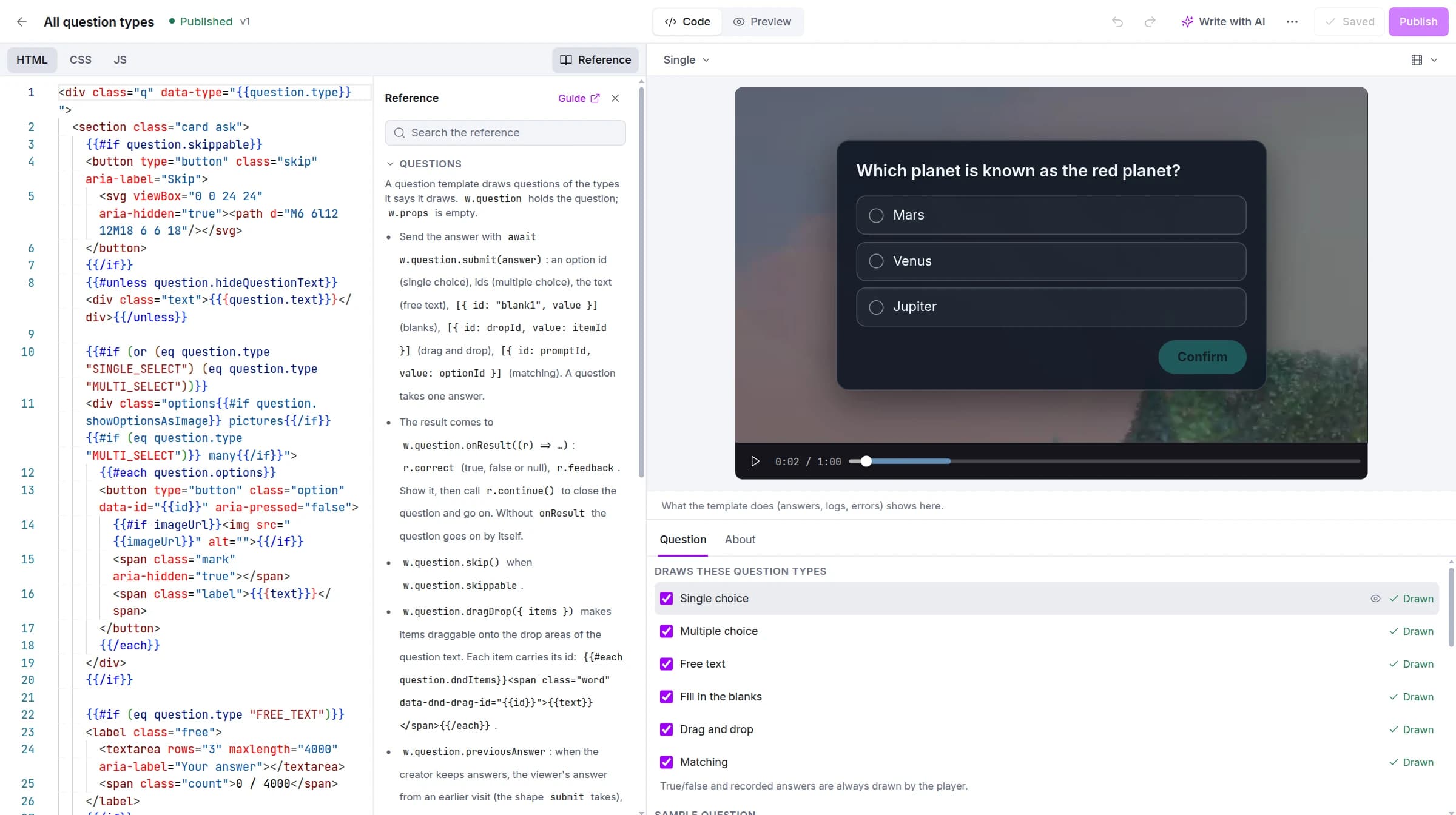
The code view shows the HTML, CSS and JS beside the stage, with the Reference panel of question templates:
The question
w.question (q below) is the question as the creator wrote it; w.props is empty.
q.type:SINGLE_SELECT,MULTI_SELECT,FREE_TEXT,FILL_IN_THE_BLANK,DRAG_N_DROPorMATCHING. The HTML is a Handlebars template ofquestion(branch with{{#if (eq question.type "MATCHING")}}); the JS readsq.q.textis HTML: render it with{{{question.text}}}orinnerHTML. A fill-in question’s blanks are<input id="blank1">inside it, a drag and drop question’s drop areas<input data-dnd-drop-id="…">.q.options({ id, text, imageUrl }),q.dndItems(the words to drag),q.matchingItems(the prompts; the options are their answers). There is no “right answer” field: only the server knows.q.submitButtonText,q.feedbackButtonText: the only button words a viewer reads; a template adds none of its own.q.skippable(draw a skip control,q.skip()),q.hideQuestionText,q.submitOnSelectandq.showOptionsAsImage(single choice: a click is the answer, no send button).q.answered: already answered in this page view; show it, take no answer.q.previousAnswer(2.2): when the creator keeps answers, the viewer’s answer from an earlier visit, in the shapesubmittakes; show it chosen, the viewer may answer again. Checkw.supports("question.previousAnswer")if the template must also run on 2.1.
The answer and the result
Send the answer once with await q.submit(answer). The answer’s shape depends on the type:
| Type | Answer |
|---|---|
| Single choice | an option’s id |
| Multiple choice | a list of option ids |
| Free text | the text |
| Fill in the blanks | [{ id: "blank1", value }] |
| Drag and drop | [{ id: dropId, value: itemId }] |
| Matching | [{ id: promptId, value: optionId }] |
submit rejects an empty or wrong-shaped answer, so let the viewer try again. A question takes one answer.
The result comes to q.onResult((r) => …): r.correct (true, false, or null when the question does not check answers), r.feedback (the creator’s HTML) and r.hasFeedback. Show it, then call r.continue(): the player closes the question, runs the creator’s actions and plays the video. Without the creator’s feedback call it at once, as the player does with its own questions. Without onResult the question goes on by itself.
c8.widget((w) => {
  const q = w.question;
  const send = w.$(".send");
  let chosen = q.previousAnswer;
  w.$$(".option").forEach((b) => w.listen(b, "click", () => {
    chosen = b.dataset.id;
    w.$$(".option").forEach((o) => o.setAttribute("aria-pressed", String(o === b)));
    send.disabled = false;
  }));
  w.listen(send, "click", () => { send.disabled = true; q.submit(chosen).catch(() => { send.disabled = false; }); });
  q.onResult((r) => {
    if (!r.hasFeedback) return r.continue();
    w.$(".result").dataset.correct = String(r.correct);
    w.$(".feedback").innerHTML = r.feedback;
    w.listen(w.$(".go"), "click", () => r.continue(), { once: true });
  });
});
The HTML beside it draws the options from the question:
<div class="card">
  {{#unless question.hideQuestionText}}<div class="text">{{{question.text}}}</div>{{/unless}}
  <div class="options">
    {{#each question.options}}<button type="button" class="option" data-id="{{id}}">{{{text}}}</button>{{/each}}
  </div>
  <button type="button" class="send" disabled>{{question.submitButtonText}}</button>
  <div class="result" hidden><div class="feedback"></div><button type="button" class="go">{{question.feedbackButtonText}}</button></div>
</div>
Drag and drop
Give each word its id and let the runtime do the dragging (mouse and touch):
{{#each question.dndItems}}<span class="word" data-dnd-drag-id="{{id}}">{{text}}</span>{{/each}}Then call const dnd = q.dragDrop({ items: w.$$(".word") }) once, and q.submit(dnd.answer()). Style the drop areas (input[data-dnd-drop-id]; a filled one carries data-c8-dnd-item). Give the viewer a way back: a button that calls dnd.reset() puts every word back in its place (a word dragged onto a filled area sends the one there back too). Never write your own drag code.
Matching
Let the viewer pick one of q.options for each of q.matchingItems (a <select> or buttons) and send a pair for each prompt: [{ id: promptId, value: optionId }].
Appearance
The question covers the whole video and pauses it: draw your own backdrop and a card that fits a wide video, a tall one and a phone (w.fit(".card"), a list that scrolls inside the card). Show right and wrong with colour and an icon, not with words of your own. The player never shows the question text or a skip button for you.
Publishing
Publishing asks you to confirm when a type you take off the list is used by questions: those questions are then drawn in the player’s look. The publish window and Where it’s used count questions, videos and player skins.
Coming from runtime 1
Question templates written before Widget API v2 keep working. When you write a new one:
| Runtime 1 | Widget API v2 |
|---|---|
c8PlayerApi.submitQuestionForm({ id, answer }) | q.submit(answer) |
_onQuestionTemplateFeedbackEvent_ and feedbackSubmitCallback() | q.onResult((r) => …) and r.continue() |
.c8-dnd-draggable, getDndAnswer() | q.dragDrop({ items }), dnd.answer() |
window.matchingMatches, getMatchingAnswer() | your own pairs: [{ id: promptId, value: optionId }] |
The rest of the differences ({{uid}}, w.$, cleanup, w.gsap) are in the Widget API v2 guide.