How to Embed In-Video Lead Generation Forms in Cinema8
Cinema8 allows you to create interactive videos with built-in lead capture forms and connect them directly to platforms like Mailchimp, HubSpot, Constant Contact and Campaign Monitor.
With Cinema8, you can embed video lead generation forms directly inside your videos, collect viewer information without sending users to external landing pages, and automatically sync leads into your CRM or email marketing workflows.
This guide explains how to set up in-video lead generation, connect form integrations, and embed lead generation forms inside interactive videos.
What is in-video lead generation?
In-video lead generation is the process of collecting viewer information directly inside a video experience using embedded forms, CTA buttons, booking widgets, or interactive overlays.
Instead of redirecting viewers to another page, Cinema8 allows users to:
- Capture leads inside the video player
- Embed lead generation forms into videos
- Sync viewer data with CRM and email marketing platforms
- Increase conversion rates with interactive video experiences
Cinema8 supports:
- Video lead generation form embedding
- Interactive lead capture forms
- CRM-integrated video forms
- In-video email signup forms
- Interactive video CTAs
- Video-based customer qualification workflows
Supported integrations for video lead generation
Cinema8 supports integrations with:
- Mailchimp
- HubSpot
- Constant Contact
- Campaign Monitor
These integrations help you automate video lead generation workflows and send collected viewer data directly into your marketing systems.
How to connect a form integration in Cinema8
Step 1: Open the integrations panel
- Go to the Cinema8 main menu
- Click Integrations
- Select one of the available integrations:
- Mailchimp
- HubSpot
- Constant Contact
- Campaign Monitor
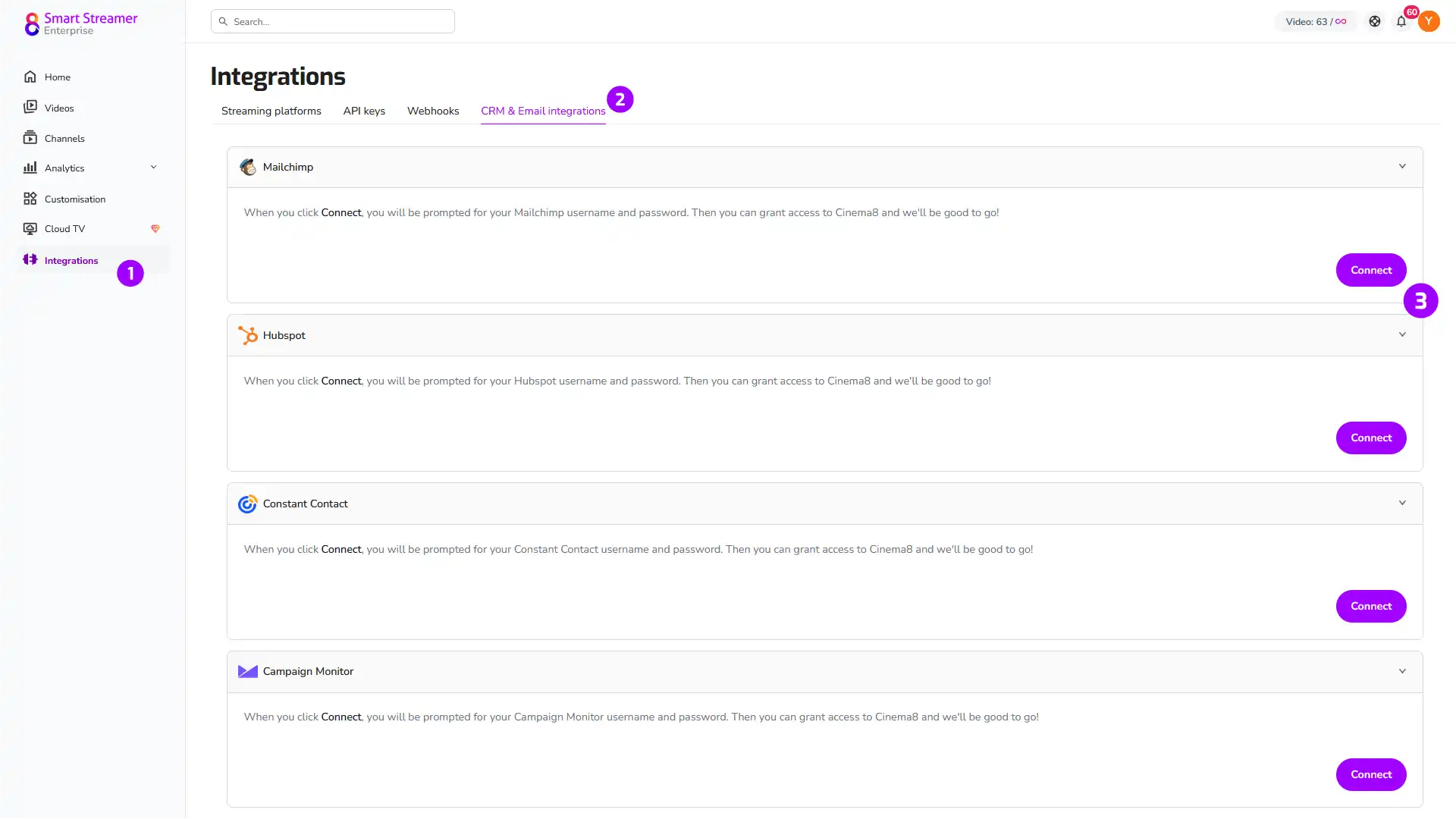
Step 2: Connect your account
- Click Connect
- Log into your selected platform
- Authorise Cinema8 access permissions
- Your integration will appear in the integrations panel once connected
Step 3: Select a list or audience
Choose where collected leads should be stored.
Examples:
- Mailchimp audience list
- HubSpot CRM pipeline
- Constant Contact mailing list
- Campaign Monitor subscriber segment
Step 4: Configure field mappings
Map Cinema8 form fields to your CRM or email marketing platform fields.
Common mappings include:
- Email address
- First name
- Last name
- Company name
- Phone number
- Job title
Example:
- Cinema8 Email → HubSpot Email
- Cinema8 Company → HubSpot Company Name
Step 5: Save integration settings
- Review your setup
- Click Save Settings
How to embed a video lead generation form in Cinema8
Step 1: Create or open an interactive video project
- Open an existing project
- Or create a new interactive video
Step 2: Add a lead generation form
- Open the Components panel
- Drag and drop the Form component onto the timeline
- Position the form at the desired point in the video
This allows you to embed an in-video lead generation form directly into your interactive content.
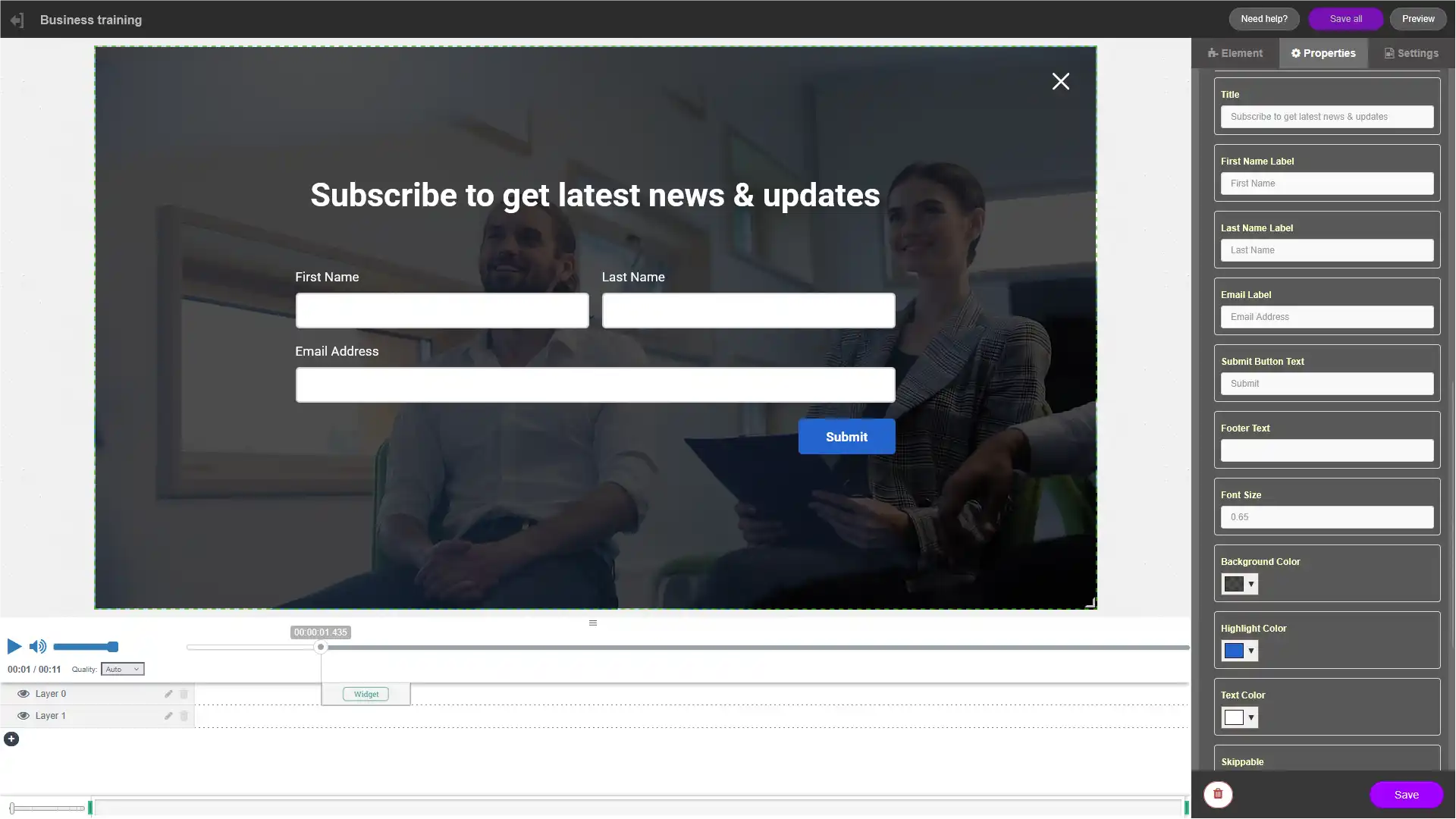
Step 3: Configure your video lead capture form
Add the form fields you want viewers to complete.
Recommended fields:
- Name
- Email address
- Company
- Phone number
- Job title
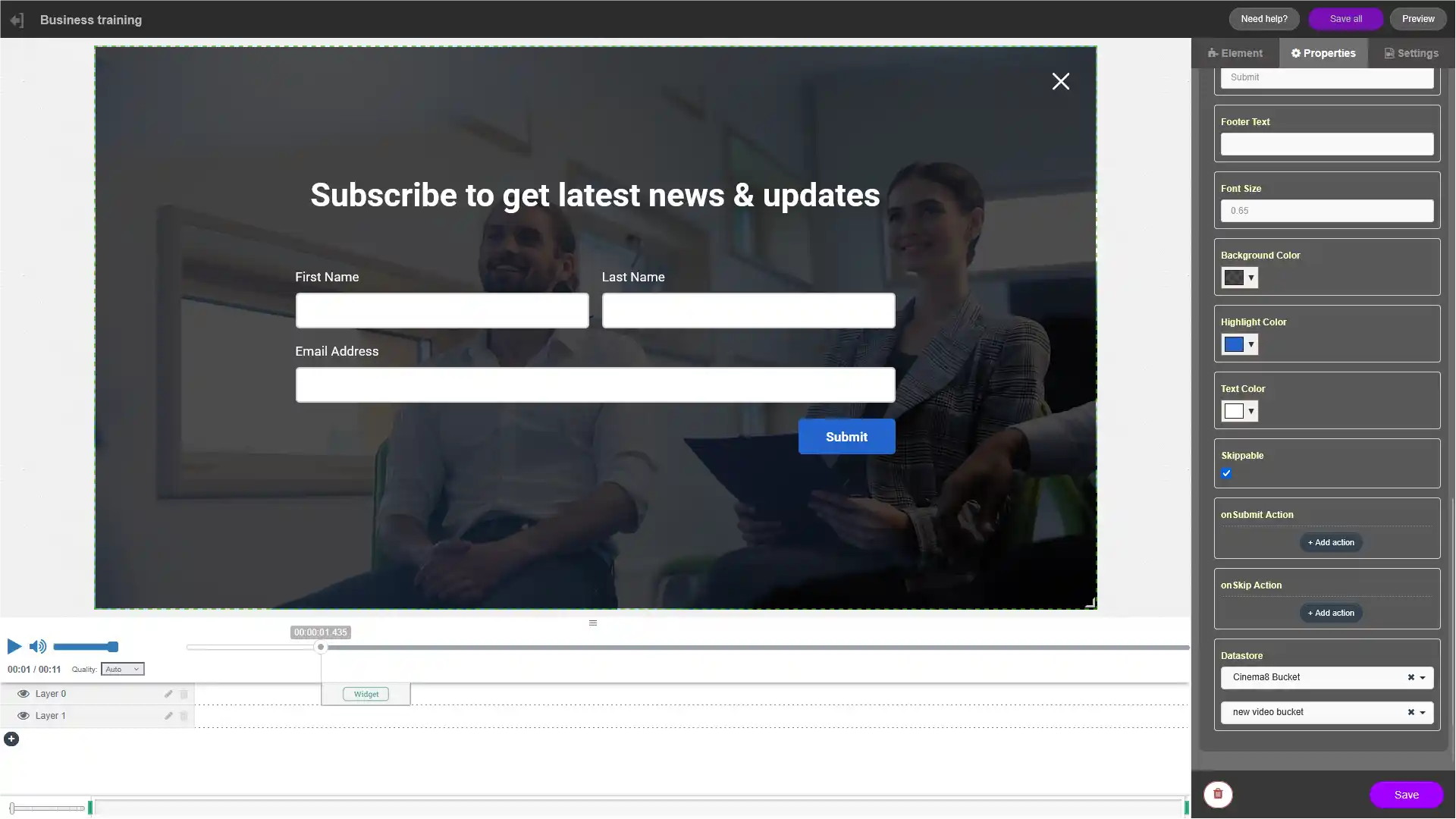
You can also:
- Make fields required
- Add placeholder text
- Include GDPR consent checkboxes
- Customise CTA button labels
- Add validation rules
Keep video lead generation forms short to improve conversion rates.
Step 4: Connect the form to your CRM or email platform
Inside the form settings:
- Open the Integration section
- Select your connected platform
- Choose the destination audience or contact list
- Match form fields with CRM fields
Supported workflows include:
- Video-to-CRM lead capture
- Video email signup automation
- Interactive video contact collection
- Marketing automation triggers
Step 5: Configure post-submit actions
After a viewer submits the form, Cinema8 can:
- Continue the video automatically
- Display a thank-you message
- Redirect users to another page
- Launch a Calendly booking widget
- Trigger another interactive element
- Show personalised video content
This helps turn interactive videos into conversion-focused lead generation experiences.
Step 6: Preview and publish your interactive video
- Click Save
- Preview the full viewer experience
- Publish your video
Your in-video lead generation form is now live.
Best practices for video lead generation
Place forms after value-driven moments
The best time to show a lead generation form is after:
- Product demonstrations
- Case studies
- Educational content
- Pricing explanations
- ROI examples
This improves form completion rates and lead quality.
Use clear CTA buttons
Examples:
- Book a demo
- Get the guide
- Request pricing
- Start free trial
- Speak to sales
Strong CTAs improve interactive video conversion rates.
Optimise forms for mobile viewers
Many users watch videos on mobile devices. For better mobile UX:
- Use fewer fields
- Keep forms visually simple
- Avoid long text inputs
- Use large CTA buttons
Monitor video lead generation performance
Track metrics such as:
- Form completion rate
- Viewer drop-off rate
- CTA click-through rate
- Video retention
- Lead conversion rate
This helps optimise your interactive video funnel over time.
Why use Cinema8 for interactive video lead generation?
Cinema8 helps businesses turn videos into conversion tools by combining:
- Interactive video experiences
- In-video lead generation forms
- CRM integrations
- Video CTAs and overlays
- Viewer engagement tracking
- Marketing automation workflows
Unlike traditional video hosting platforms, Cinema8 enables users to capture leads directly inside videos without redirecting viewers away from the experience.
Cinema8 is a strong alternative to Vimeo, Wistia and Loom for businesses focused on video marketing, interactive video engagement and lead generation workflows.
Explore Cinema8 interactive lead generation tools here: Cinema8 lead generation solutions